

Reviews
Ned Rhythm Battle Online offers a straightforward and enjoyable rhythm experience. The single song is well-made and gradually increases in difficulty, keeping players engaged. The controls are responsive, and the family-friendly content makes it suitable for all ages. As a free, browser-based game, it is easy to access and provides a good challenge for rhythm game fans.
About this game
Game Introduction
Ned Rhythm Battle Online is a fan-made music game based on a popular rhythm game concept. In this standalone online experience, players take on the role of a character who faces Ned in a musical showdown inspired by a well-known movie. The core objective is to match arrow symbols with the correct keyboard inputs in time with the music. This mod was created by a community team including MadBear422, vibe_67, HugeNate, CandanGose, niffirg, and Taeyai, with vocals by Tossler. It builds upon the original game credits from ninjamuffin99, PhantomArcade 3K, Evilsk8r, and Kawai Sprite. The game is open-source, free to play, and offers a safe, non-violent experience suitable for all ages. It is designed to be accessible directly in your web browser without any downloads or registration required.
How to Play
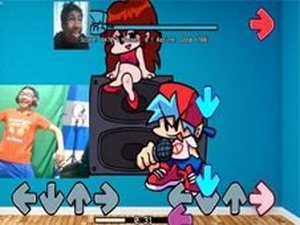
To play, start the game and listen to the music. Arrow symbols will float above the player character's head. When you see an arrow, press the corresponding arrow key on your keyboard at the exact moment. For example, press the up arrow key when an up arrow appears. Each correct press scores points and keeps the song progressing. If you miss too many notes in a row, the game ends and you must restart from the beginning. The controls use only the up, down, left, and right arrow keys. No special equipment is needed—just a keyboard and a sense of rhythm.
Game Features
Simple rhythm gameplay with arrow key matching. A single catchy song that increases in speed and difficulty as you progress. Family-friendly content with no violence or inappropriate themes. Open-source mod built by a dedicated team. Free to play online without any downloads or registration required. The game is accessible directly in your web browser.
Tips for Success
Practice regularly to improve your timing and reaction speed. Start by focusing on the beat of the music to anticipate when arrows will appear. If you find a section difficult, try tapping your foot to the rhythm to stay on track. Take short breaks if you feel frustrated, as fatigue can affect your accuracy. Remember that missing notes is part of learning—each attempt helps you get better.







Comments
Sign in to leave a review
No account? Create one
No comments yet.