
Reviews
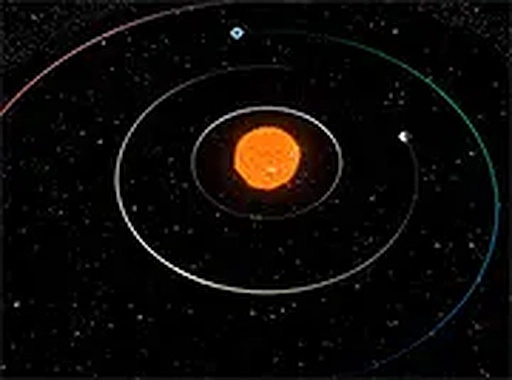
Planetary Motion Viewer stands out for its simplicity and focus. It does one thing well: showing how planets move around the sun. The controls are intuitive, the visuals are clear, and the adjustable speed reveals patterns that textbooks struggle to convey. It is an excellent resource for teachers and a relaxing way for anyone to appreciate the clockwork of our solar system. No distractions, just pure observation.
About this game
Core Observation Experience
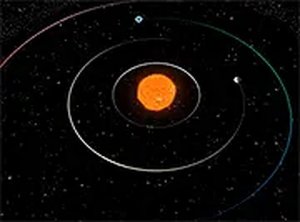
Planetary Motion Viewer focuses entirely on the visual representation of orbital mechanics. Users can see each major planet travel along its elliptical path around the sun, with each orbit progressing at a different rate. The simulation uses realistic physics to model gravitational influences, so inner planets complete their circuits faster than outer ones. This design makes abstract concepts like orbital periods and planetary alignment tangible through direct observation. There are no objectives to complete or obstacles to avoid, allowing users to simply watch and learn at their own pace.Interactive Controls
The tool offers straightforward mouse and keyboard controls for navigating the solar system. Clicking and dragging rotates the viewing angle, while scrolling adjusts the zoom level from a wide system view down to a close-up of a single planet. Keyboard shortcuts enable smooth panning across the scene and allow users to speed up or slow down the simulation. A pause function freezes the action for detailed study of specific planetary positions. These controls are designed to be intuitive, so even first-time users can start exploring without reading instructions.Educational Value
This simulator is built for classrooms, self-study, and casual curiosity. Teachers can use it to demonstrate how planets move relative to each other, while students can experiment with speed settings to compare orbital periods. The clean interface removes distractions, keeping the focus on the celestial mechanics at work. Because it runs entirely in a web browser, there is no software to install, making it accessible on school computers or personal devices. The tool supports modern browsers like Chrome, Firefox, and Edge.Observing Orbital Patterns
By adjusting the simulation speed, users can compress years of planetary motion into seconds, revealing long-term patterns such as planetary alignments and the varying distances between planets. Zooming in on individual planets shows their unique orbital shapes and relative sizes. The pause feature allows for careful examination of specific moments, such as when two planets appear close together in the sky. Regular use of these features helps build an intuitive understanding of how gravity shapes the solar system.Tips for Deeper Learning
To get the most from Planetary Motion Viewer, spend time observing each planet individually. Notice how Mercury zips around the sun while Neptune takes over a century to complete one orbit. Experiment with the speed control to see how these differences create changing configurations over time. Use the pause button to study interesting alignments and compare the positions of planets across different dates. Consistent observation turns abstract numbers into a visual story of our cosmic neighborhood.Compatibility
Play on Any Device | Chrome / Safari / Edge Recommended
FAQ
Does Planetary Motion Viewer work on mobile devices?
The simulator is optimized for desktop browsers like Chrome, Firefox, and Edge. While it may load on some mobile browsers, the mouse and keyboard controls are designed for a full-sized screen. Touch controls are not currently supported.
Can I see moons or asteroids in the simulation?
Planetary Motion Viewer focuses on the eight major planets orbiting the sun. It does not include moons, asteroids, or dwarf planets. The simulation is intentionally kept simple to emphasize the primary orbital mechanics of the solar system.
Is there any sound or music in the tool?
No. The tool is completely silent, with no background music or sound effects. This design choice helps maintain a calm, distraction-free environment suitable for focused learning and classroom use.
How accurate are the orbital paths compared to real astronomy?
The simulation uses realistic physics to model elliptical orbits and relative speeds. While it provides a strong visual representation of orbital mechanics, it simplifies some details like gravitational interactions between planets. It is excellent for educational purposes but not a precise ephemeris.
Do I need to create an account to use Planetary Motion Viewer?
No account or registration is required. The tool runs directly in your web browser with no login, downloads, or installations. Simply open the page and start exploring the solar system immediately.
Can I use this tool for a school science project?
Yes. Planetary Motion Viewer is well-suited for classroom demonstrations and independent student projects. Teachers can use it to illustrate orbital periods, planetary alignment, and the relative motion of planets. The adjustable speed and pause features make it easy to highlight specific concepts.





Comments
Sign in to leave a review
No account? Create one
No comments yet.