

Reviews
Curve Master Racing Sim strips away unnecessary elements and focuses on one core challenge: navigating corners with control. The responsive steering makes every input count, and the track designs encourage repeated attempts to shave off seconds. It runs smoothly on any device, making it easy to pick up during a break. While it lacks customization or multiplayer features, its straightforward approach to skill-based driving is refreshing. For players who enjoy perfecting their line through a tricky turn, this game delivers a satisfying loop of practice and improvement.
About this game
Track Layout & Visual Style
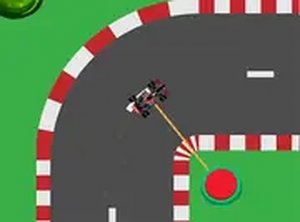
Each course in Curve Master Racing Sim presents a distinct arrangement of curves and straight sections. The visual design keeps the focus on the road ahead, with clear markings and a clean interface that helps players anticipate upcoming turns. Tracks vary in complexity, from gentle bends to tight hairpins that demand quick reactions. The overall look is streamlined, letting players concentrate on the driving line without unnecessary distractions.
Vehicle Handling & Control Response
The formula-style car responds directly to input, with steering that feels immediate and predictable. There is no delay between pressing a key or tapping the screen and seeing the car change direction. This responsive setup means that every small adjustment matters. Players must learn how much to turn and when to straighten out to carry speed through corners. The handling model rewards smooth inputs over jerky movements, making each lap a lesson in finesse.
Progression Through Practice
Mastering a track requires repeated attempts. Each run provides feedback on where time was lost or where control slipped. Over several tries, players develop a mental map of the optimal path. The game does not punish failure harshly; instead, it encourages experimentation with different approaches to each corner. This gradual learning curve makes the experience accessible to newcomers while still offering depth for those who want to perfect their technique.
Platform Accessibility & Performance
Curve Master Racing Sim runs smoothly in standard web browsers on both desktop computers and mobile devices. Loading times are minimal, allowing players to jump into a race within seconds. The interface adapts to different screen sizes, ensuring that touch controls on phones feel just as natural as keyboard inputs on a laptop. This flexibility means the game fits easily into short breaks or longer practice sessions.








Comments
Sign in to leave a review
No account? Create one
No comments yet.